how to fetch crude oil option ltp , bit confused with segment , shud i use NSE_FNO or MCX_COMM
They do not have crude oil option chain data fetching function yet. Please wait till they bring - God know when
Hey @butta12 ,
To fetch option chain data for Crude Oil, mention the exchange segment as MCX_COMM and use the security ID of any option contract.
for example for Gold option data:
dhan.option_chain(
under_security_id=481575,
under_exchange_segment=“MCX_COMM”,
expiry=“2025-11-26”
)
Same error for long now -----Logged into Dhan-----
reading existing file all_instrument 2025-11-08.csv
Got the instrument file
 Dhan Master file saved as dhan_master_file.csv
[‘FUTCUR’ ‘OPTCUR’ ‘OPTSTK’ ‘OPTIDX’ ‘FUTSTK’ ‘FUTIDX’ ‘EQUITY’ ‘INDEX’
‘FUTCOM’ ‘OPTFUT’]
Fetching Option Chain for Security ID: 481575 on MCX_COMM…
 An error occurred while fetching the option chain: ‘Tradehull’ object has no attribute ‘option_chain’
Hey @raj001 ,
Thanks for bringing this up @Tradehull_Imran might be able to assist here.
Thank you @Tradehull_Imran could you please check this. otherwise, I have to move to Zerodha.
Below is the code @Tradehull_Imran and @Shrutika_Poojari @PravinJ
import time
from datetime import datetime
import pandas as pd
import talib
import traceback
from Dhan_Tradehull_V2 import Tradehull
— DHAN LOGIN —
— DHAN LOGIN —
CLIENT_ID = " your CLIENT_ID"
ACCESS_TOKEN = “your token details”
print(“Initializing Tradehull connection…”)
tsl = Tradehull(client_code, token_id)
Initialize the official dhanhq client for data fetching
dhan = Tradehull(CLIENT_ID, ACCESS_TOKEN)
URL for the compact master file (lighter to download)
MASTER_URL = pd.read_csv(“https://images.dhan.co/api-data/api-scrip-master-detailed.csv”, low_memory=False)
— SAVE THE DATAFRAME —
MASTER_URL.to_csv(‘dhan_master_file_01.csv’, index=False)
print(“ Dhan Master file saved as dhan_master_file.csv”)
------------------------------------
— 2. DYNAMICALLY FIND THE CRUDE OIL SCRIP ID (Optional step for context) —
a = MASTER_URL.INSTRUMENT.unique()
print(a)
indexdf=MASTER_URL[MASTER_URL.INSTRUMENT == ‘OPTFUT’]
NAME_01 =indexdf[(indexdf.DISPLAY_NAME == ‘CRUDEOIL 17 NOV 5400 CALL’)]
print(NAME_01)
opt_crd=dhan.option_chain(
under_security_id =467015,
under_exchange_segment=‘MCX_COMM’,
expiry=‘2025-11-17’
)
print(opt_crd)
Assuming dhan object is correctly initialized
from dhanhq import dhanhq
dhan = dhanhq(CLIENT_ID, ACCESS_TOKEN)
1. Define Parameters for Crude Oil Options
CRUDEOIL_FUTURE_ID = “481575”
EXCHANGE = “MCX_COMM”
INSTRUMENT = “OPTFUT” # Options on Commodity Futures
try:
# *** Use the V2 Python Client standard parameters ***
option_chain_data = dhan.option_chain(
under_security_id=481575,
under_exchange_segment= MCX_COMM,
expiry=2025-11-26
)
# ... rest of your code to process the DataFrame
# option_chain_df = pd.DataFrame(option_chain_data.get('optionChain', []))
# ...
except Exception as e:
print(f" An error occurred while fetching the option chain: {e}")
Hi @raj001 ,
- Open your command prompt
- Run the following command to find where the
Dhan_Tradehull.pyfile is located:
pip show Dhan-Tradehull
- Look for the line starting with
Location:in the output. - Example:
Location: C:\Users\<username>\AppData\Local\Programs\Python\Python311\Lib\site-packages
- Inside that folder, navigate to:
Dhan_Tradehull.py
- Scroll or search (Ctrl + F) for:
def get_option_chain():
- Inside the function, locate this line:
else:
	raise Exception(f"No option chain data available for the {Underlying}")
Before this line add the below code-
elif Underlying in self.commodity_step_dict:
	strike_step = self.commodity_step_dict[Underlying]
And save the file. This will solve the problem, Let me know if you face any issues. We will update the codebase for this in our upcoming version.
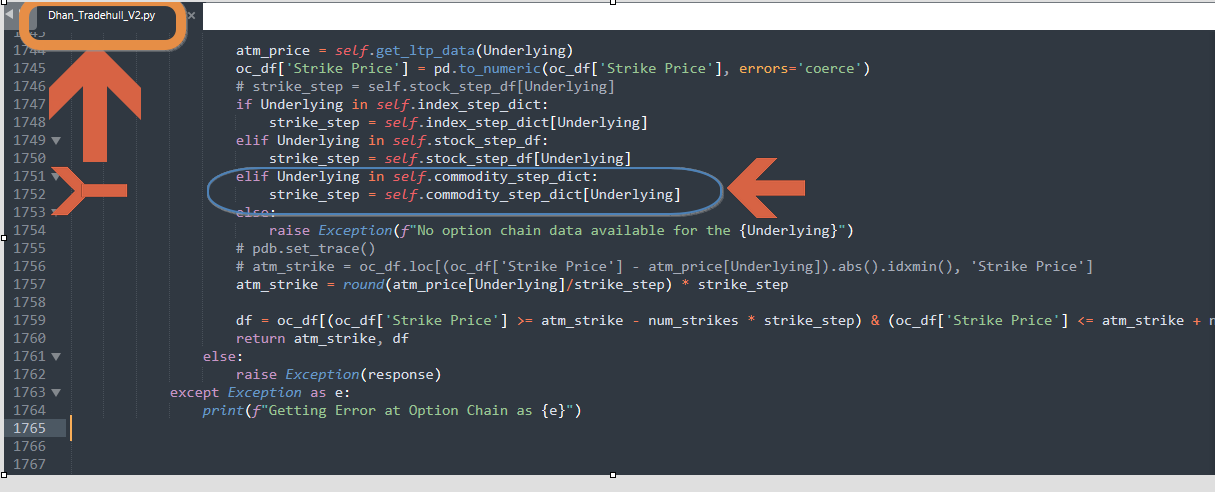
Hello @Tradehull_Imran , I am using Dhan_Tradehull_V2.py not Dhan_Tradehull.py, I checked in the Dhan_Tradehull_V2,py file and placed the code you said just before (elif Underlying in self.commodity_step_dict: strike_step = self.commodity_step_dict[Underlying] ) else statement but still showing the same error.
Please check the attached images for reference.
Please refer the current code that i am using to test :-
import time
from datetime import datetime
import pandas as pd
import talib
import traceback
from Dhan_Tradehull_V2 import Tradehull
CLIENT_ID = “Please use your client ID”
ACCESS_TOKEN = “Please use your token”
Dhan = Tradehull(CLIENT_ID, ACCESS_TOKEN)
try:
option_chain_data = Dhan.option_chain(
under_security_id=467015,
under_exchange_segment=MCX_COMM,
expiry= 2025-11-17
)
option_chain_df = pd.DataFrame(option_chain_data.get(‘optionChain’, ))
print(“ Option Chain Fetched Successfully.”)
print(option_chain_df.head())
except Exception as e:
print(f" An error occurred while fetching the option chain: {e}")
Please refer the error :—
C:\Users\Admin\Desktop\20250925_DHAN_01\SLEF_PROJECTS\20251108_CRUDEOI_TEST>py 02_20251110_CRUDEOIL_TEST.py
Codebase Version 2.8 : Solved - Strike Selection Issue
-----Logged into Dhan-----
reading existing file all_instrument 2025-11-10.csv
Got the instrument file
An error occurred while fetching the option chain: ‘Tradehull’ object has no attribute ‘option_chain’
Your timely response will save much time for me as well for others those are waiting for long .
Thank you in advance @Tradehull_Imran ,@Shrutika_Poojari and @PravinJ
Hi @raj001 ,
Do update to our latest codebase version 3.0.6:
- Open Command Prompt: Press Win, type cmd, and press Enter.
- Install Dhan-Tradehull: Run
pip install Dhan-Tradehull - Confirm the installation by running
pip show Dhan-Tradehull
Guide to use the updated codebase:
Refer the below pypi link for more details:
Video reference :
Refer the below code-
strike,option_chain = tsl.get_option_chain(“GOLD”, “MCX”,0,10)
1 Like
Hello I got the data for CRUDEOIL Option chain data.
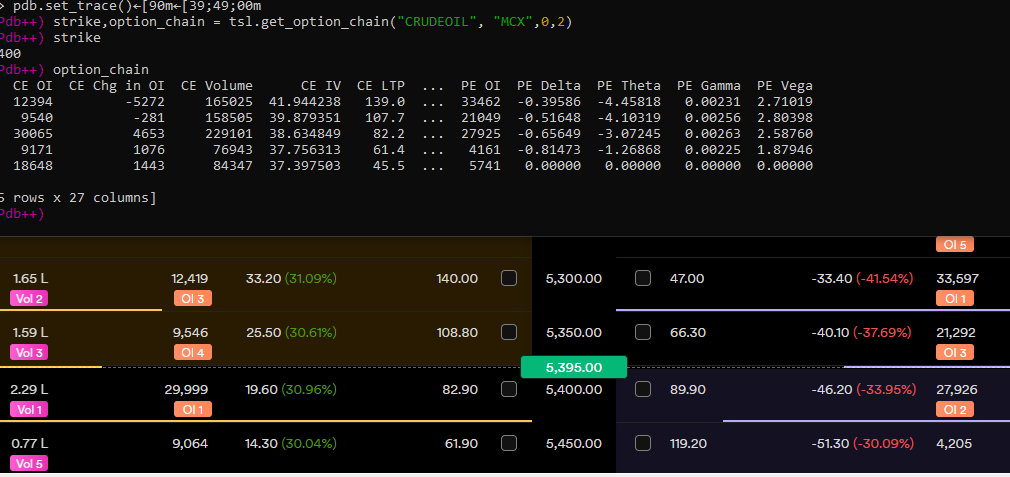
Thank you @Tradehull_Imran @Shrutika_Poojari @butta12
1 Like
Hello @Tradehull_Imran
Some suggestions to consider into the new development for Dhan_Tradehull_V3, Please Compare Dhan_Tradehull.py- get_option_chain function with Dhan_Tradehull_V2.py- get_option_chain function , I have fixed on my side.
Commodities Trading 

 please use the Dhan_Tradehull.py file for commodities option chain data
Hello @Tradehull_Imran
MINI -OPTION CHAIN data are missing like CRUDEOILMINI, SILVERMINI, NATURALGASMIN in the self.commodity_step_dict
self.commodity_step_dict = {‘GOLD’: 100,‘SILVER’: 250,‘CRUDEOIL’: 50,‘NATURALGAS’: 5,‘COPPER’: 5,‘NICKEL’: 10,‘ZINC’: 2.5,‘LEAD’: 1, ‘ALUMINIUM’: 1, ‘COTTON’: 100, ‘MENTHAOIL’: 10, ‘GOLDM’: 50, ‘GOLDPETAL’: 5, ‘GOLDGUINEA’: 10, ‘SILVERM’: 250, ‘SILVERMIC’: 10, ‘BRASS’: 5, ‘CASTORSEED’: 100, ‘COTTONSEEDOILCAKE’‘CARDAMOM’: 50, ‘RBDPALMOLEIN’: 10,‘CRUDEPALMOIL’: 10,‘PEPPER’: 100, ‘JEERA’: 100, ‘SOYABEAN’: 50, ‘SOYAOIL’: 10, ‘TURMERIC’: 100, ‘GUARGUM’: 100, ‘GUARSEED’: 100, ‘CHANA’: 50, ‘MUSTARDSEED’: 50, ‘BARLEY’: 50, ‘SUGARM’: 50, ‘WHEAT’: 50, ‘MAIZE’: 50, ‘PADDY’: 50, ‘BAJRA’: 50, ‘JUTE’: 50, ‘RUBBER’: 100, ‘COFFEE’: 50, ‘COPRA’: 50, ‘SESAMESEED’: 50, ‘TEA’: 100, ‘KAPAS’: 100, ‘BARLEYFEED’: 50, ‘RAPESEED’: 50, ‘LINSEED’: 50, ‘SUNFLOWER’: 50, ‘CORIANDER’: 50, ‘CUMINSEED’: 100 }
so that i can’t get the mini option chain data please let me know code no for all minis or please update the code and let me know . Big Thank you @Tradehull_Imran
Hi @raj001 ,
You can add required symbol in self.commodity_step_dict
As in for SILVERMINI - ‘SILVERM’ : 250 is already present
{‘CRUDEOILM’ : 50, ‘NATGASMINI’: 5}
1 Like
Hello @Tradehull_Imran, CRUDEOILM and NATGASMINI is not working please check the below error tried changing name from NATGASMINI to NATGASM but still not getting the data
Error
Codebase Version 2.8 : Solved - Strike Selection Issue
-----Logged into Dhan-----
reading existing file all_instrument 2025-11-12.csv
Got the instrument file
INFO: Output file: 2025-11-12_NATGASMINI_59-Seconds.xlsx
qty: 250
INFO: Using hardcoded expiry date for output display: 20 NOV
Exception for instrument name NATGASMINI 20 NOV 400 CALL as Check the Tradingsymbol
INFO: Trade limit (2/3) reached. Monitoring current position or waiting for EOD.

================================================================================
Hi @raj001 ,
Itseems you are still using the old version of codebase of 2.8. Firstly do update to our latest codebase version 3.0.6. Then update the necessary changes in the new file.
- Open Command Prompt: Press Win, type cmd, and press Enter.
- Install Dhan-Tradehull: Run
pip install Dhan-Tradehull - Confirm the installation by running
pip show Dhan-Tradehull
Guide to use the updated codebase:
Refer the below pypi link for more details:
Video reference :
Hello @Tradehull_Imran, I checked I am using the correct version and reconfirm using the shared videos and guidelines its just print massage and now All MINIs of commodities are working well.
My algorithm now supports all Index, F&O Stocks, and MCX instruments.
Thank you so much for valuable support, If I need any future assistance, I will drop a msg
1 Like