@Dhan@Hardik , HI dhan please check the dhanhq lib after recent update of option historic data, market depth to 200, I am unable to get data properly for testing,
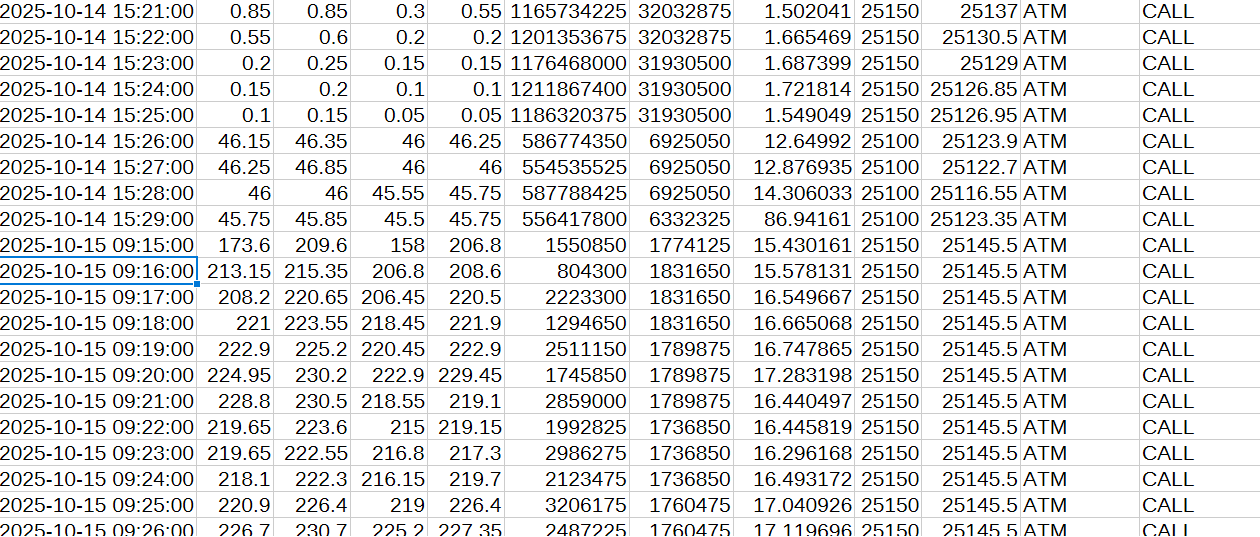
1.for example in option historic data, I got spot value same through out the day after 14 oct onwards even changed time 90 days to 15 days same result.
Market depth no separate request code for 200 market depth is their in annexure and only url is different but i checked so many times 20 market depth only working but 200 market depth connecting but not returning any data.
Today while I tried to test market feed script, at least in past they used to return closing data, but today no data returned. Once check these issues most of codes used to work in past today not got any data from dhanhq even after connecting and subscribing.(may be dhan team doing maintainance or upgrades please check once).
Last but not least python package upgradation plan: dhanhq · PyPI, as more and more upgrades your team are adding once check versions and if possible upgrade, why because i am observing some times old versions are not able to keep up with upgrades and crashes, so kindly note this and check upgradation of python lib.
For the historic data part, we request you to please share the detailed query over help@dhan.co so we can understand it better and assist you accordingly.
For the 200-level market depth, please use the below request structure (this will also be updated soon in the documentation):
{
“RequestCode”: 23,
“ExchangeSegment”: “NSE_EQ”,
“SecurityId”: “1333”
}
Please try again today if you still face any error, do share your request structure over email for us to check.
Noted your feedback on the Python package upgrade we’ll pass it on to the concerned team.
same issue with 200 level data : I was trying to subscribe for 200 level data streaming through websocket but after connection was established , i couldn’t recieve the messages : i have used the offical documentation with requestcode 23 but still dosn’t work
I was trying to subscribe for 200 level data streaming through websocket but after connection was established , i couldn’t recieve the messages : i have used the offical documentation with requestcode 23 but still dosn’t work PS D:\test\backend> python debug_dhanhq_connection.py Testing DhanHQ WebSocket connection…
INFO:auth:Environment variables loaded from .env file
INFO:auth:DhanHQ credentials loaded and validated successfully Credentials loaded successfully
Client ID: 1103706176
Access Token: ********************…SYCMnrmGMQ
INFO:parser_config:Loaded parser configuration: {‘mode’: ‘corrected’, ‘enab
le_fallback’: True, ‘log_parser_selection’: True, ‘validation_enabled’: True, ‘performance_monitoring’: False} INFO:parser_config: DhanHQ Parser Configuration:
INFO:parser_config: Mode: corrected
INFO:parser_config: Fallback Enabled: True
INFO:parser_config: Validation Enabled: True
INFO:parser_config: Performance Monitoring: False
INFO:parser_config: Using default configuration (no environment variables
set) INFO:parser_factory: Initialized corrected parser as primary
INFO:parser_factory: Legacy parser available as fallback
INFO:parser_config: DhanHQ Market Depth Parser Startup:
INFO:parser_config: Selected Parser: corrected
INFO:parser_config: Using corrected 200-level parser (RequestCode 23,
12-byte header) INFO:parser_config: Features: 200 bid/ask levels, comprehensive valida
tion, compliance monitoring INFO:parser_config: Fallback enabled: Will switch to legacy parser if
corrected parser fails INFO:parser_config: Validation enabled: Comprehensive message validati
on active Connecting to DhanHQ…
INFO:websocket_client:Connecting to DhanHQ WebSocket API…
INFO:websocket_client: Connected to DhanHQ WebSocket API successfully
INFO:websocket_client: Started DhanHQ ping-pong compliance monitoring
INFO:websocket_client: Official requirements: Server ping every 10s, client response within 40s Connected to DhanHQ successfully Subscribing to RELIANCE (1333) on NSE_EQ…
INFO:compliance_logger: Attempting subscription: 1333 on NSE_EQ (RequestC
ode: 23) (correlation_id: 8af7eeb5) INFO:compliance_logger: Subscription OK: subscription_request: RequestCod
e 23 (success) (correlation_id: 8af7eeb5) INFO:websocket_client:Sent corrected subscription (RequestCode 23) for 1333
on NSE_EQ INFO:websocket_client: Successfully subscribed to 1333 on NSE_EQ for 200-
level depth INFO:websocket_client: Note: Only one instrument can be subscribed per co
nnection (DhanHQ 200-level API restriction) INFO:compliance_logger: Subscription OK: subscription_success: RequestCode 23 (success) (correlation_id: 8af7eeb5) Subscription successful Waiting for market data (30 seconds)…
We would like to inform you that, as of now, we do not provide Python code for this. However, you may use the base request structure given below
{
“RequestCode”: 23,
“ExchangeSegment”: “NSE_EQ”,
“SecurityId”: “1333”
}
This is the screen shot of option data output irrespective of expiry code and date time period same output comes , i.e., after 14 oct spot price remains same throughout the day for 15 oct one spot price, next for 16 oct another spot price, in real time spot price changes minute to minute .But here in out put same thorough out the day.
Coming to 200 market depth the response header need to checked once, why because i have doubt as both 20, 200 has same request code may be we are getting both data which overlapping and causing such no response once confirm this also so that we can check 200 phrasing output.
If you are fetching data using the endpoint https://api.dhan.co/v2/#/operations/optionchart, we have replicated the same and observed that the spot price changes at minute intervals. If you are still unable to receive data properly , please share the request structure with us over email at help@dhan.co.
 Testing DhanHQ WebSocket connection…
 Credentials loaded successfully
 DhanHQ Parser Configuration:
 Legacy parser available as fallback
 DhanHQ Market Depth Parser Startup:
 Features: 200 bid/ask levels, comprehensive valida
 Connecting to DhanHQ…
 Official requirements: Server ping every 10s, client response within 40s
  Subscribing to RELIANCE (1333) on NSE_EQ…
 Waiting for market data (30 seconds)…
 Connection Statistics:
 No market data received
 Disconnected from DhanHQ