When importing stocks in a new TV watchlist, the stocks appear in alphabetic order. Can you please retain the order of the comma separated list instead? Or provide an option to retain the list order when importing?
Hi @Conrad_Ray We have noted your feedback regarding the watchlist getting imported in alphabetical order. Totally understand that it would be more convenient if it followed the same order as in your file.
Really appreciate you bringing this to our attention.
In fact when I import a list of symbols in watchlist in Dhan Web trader the symbols get imported in Reverse Alphabetical order.
So, after importing the list we need to manually rearrange the symbols as per our preferred order. This is really annoying and irritating.
Ideally it should import the list in the same sequence or order in which we have copied it in the import watchlist box.
Following are some of the screenshots for reference.
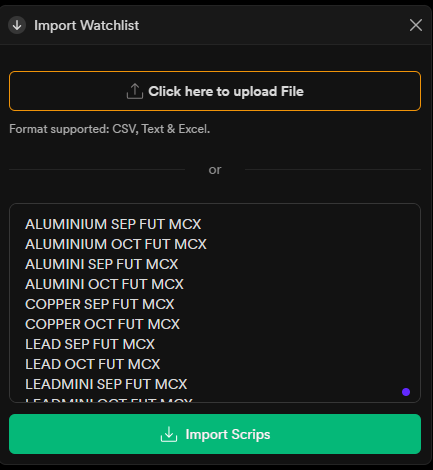
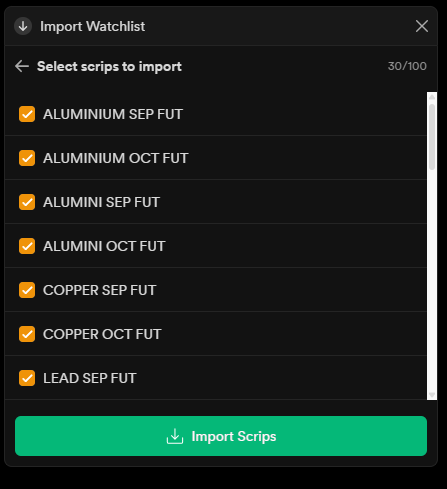
The process of importing is fine up to this point but the final result show up side down i.e. reverse alphabetical order of symbols as follows.
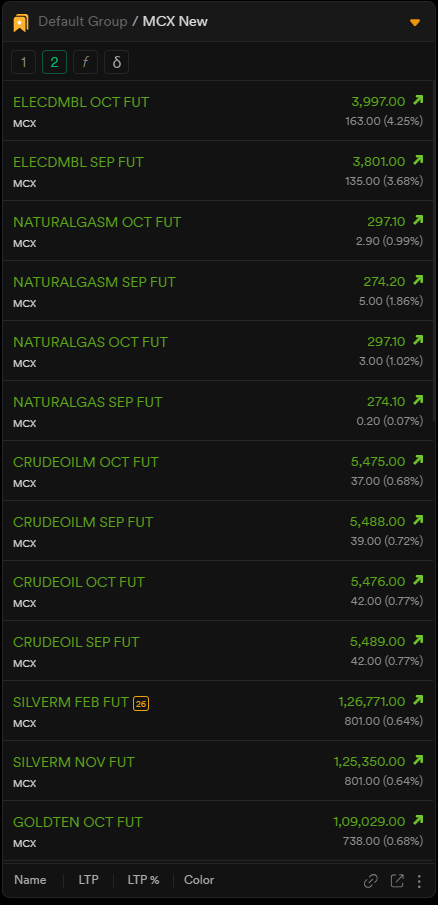
Request to Dhan team to kindly look into it to rectify this and make sure that the list gets imported in the same sequence as it is copied in the Import Box.
Also it will be more convenient if there can be a feature to lock or disable the sorting option for a particular watchlist so that accidentally if we click the name button in the bottom it should not change the sequence or order of the symbols in our watchlist.
Thanks.
Hi @Indian_Trader_007, we understand your requirement and have shared your suggestion with our team for further optimisation